Case Study
SoloPro
Scheduling and operations software for field service businesses
SoloPro is a product we designed and built, not a client project. We started by spending time understanding how field service businesses operate and found that the tools available to these companies didn't reflect how they actually work.
The Problem
How field service businesses actually operate
A field service business coordinates skilled labor across geography and time. On any given day, a company with three technicians might have eight jobs scheduled across a 30-mile radius. Each job has a different duration, requires different equipment, and involves a different customer with a different history.
When a morning job runs long, the afternoon schedule shifts. When a homeowner calls about a frozen pipe in their basement, someone needs to determine which crew member has the right skills and an available slot. When it's time to quote the repair, the price depends on what the technician finds on site, the parts needed, and how long the work will take.
Most of this coordination still happens through phone calls, paper calendars, and the owner's memory. The tools available to these businesses were designed for larger operations with dedicated office staff, or they're generic scheduling apps that treat a furnace inspection the same as a haircut appointment.
Three roles, three sets of constraints
The owner runs the business and often works jobs too. They check the schedule from a truck between appointments and make pricing decisions in the field, sometimes while standing in a customer's basement. Their time is split between doing the work and managing the work, and every tool they use needs to function in both contexts.
The office coordinator handles incoming calls, dispatches crews, and manages the schedule. They need to see all crews across the full week at once, identify gaps, and respond to changes as they happen without losing track of anything.
The field technician needs to know three things before arriving at a job: where to go, what to bring, and what to expect. The more context they have before they knock on the door, the better the job goes.
The Thinking
Decisions and the reasoning behind them
The schedule
Field service operators plan their weeks around crew availability and job duration. A plumbing specialist and an HVAC technician have different skills, different equipment, and different jobs. The owner needs to see all of them across the full week to identify gaps, conflicts, and overloaded days.
This means the schedule can't be organized by job or by customer. It needs to be organized by crew member across time, because that's how the owner thinks about capacity. And because jobs include travel, the schedule needs to account for the time between appointments, not just the appointments themselves.
The schedule view shows a full week with crew members color-coded and listed alongside their specialties. Travel buffers appear before each job block as built-in spacing. Filtering by crew member or job status lets the coordinator focus on one crew's day or see all scheduled work at once. When the frozen pipe call comes in for the Johnson Residence, the coordinator can see that Sarah, the plumbing specialist, has Tuesday afternoon open.
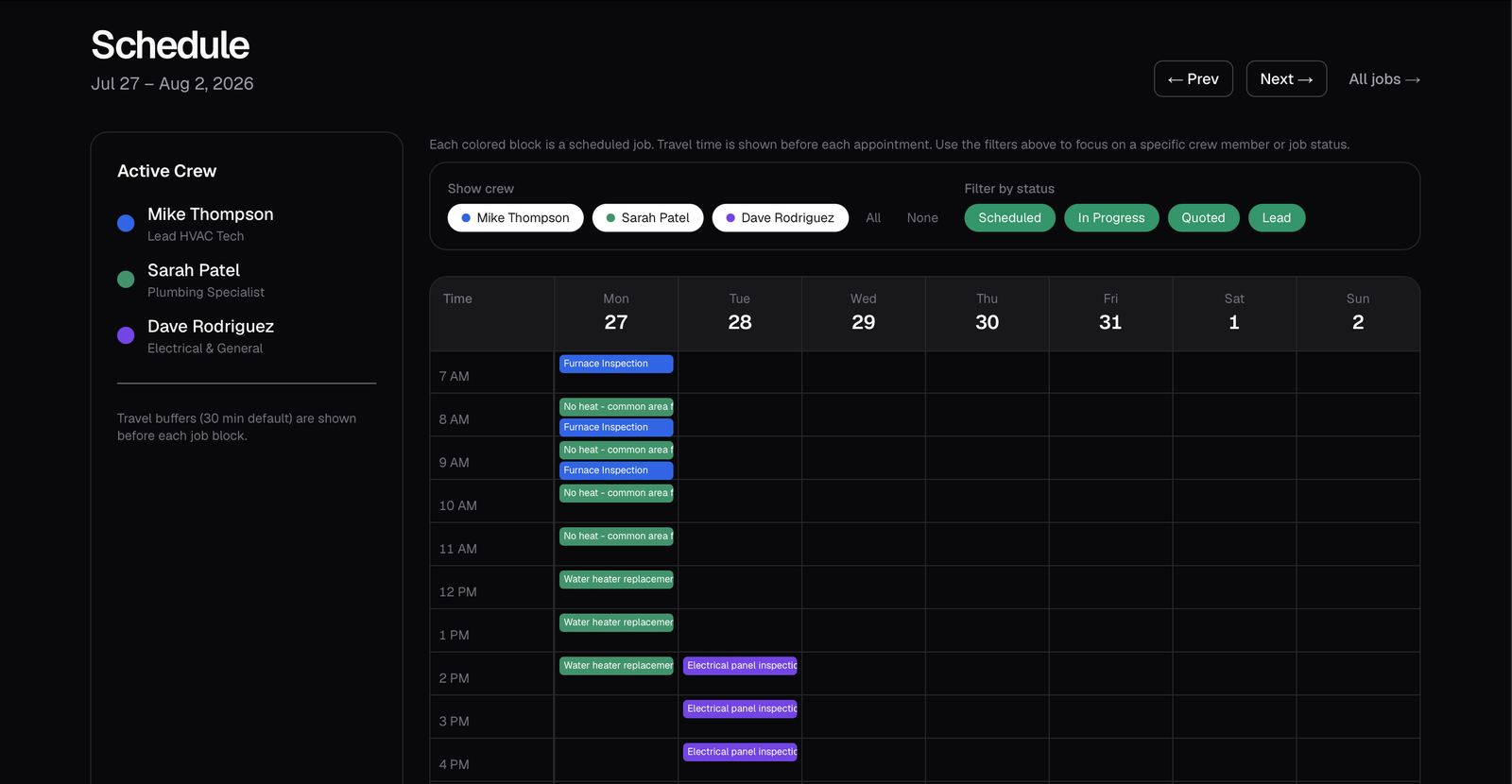
Weekly schedule with crew color-coding, travel buffers, and status filtering. The left panel shows active crew members with their specialties. The calendar shows Monday through Sunday with time slots from 7 AM onward.
The quote builder
Pricing a field service job involves standard rates and situation-specific judgment. The Johnson Residence frozen pipe, now on Tuesday's schedule, has a standard diagnostic cost, but the repair might also require drywall work, pipe insulation, or additional labor depending on what the technician finds on site.
A quoting tool that forces the owner to remember every price or search through a catalog creates friction at the moment the business needs to move quickly. But fully automating the quote would miss the judgment calls that experienced operators make every day. The system needed to accelerate the standard parts of pricing while preserving the parts that require experience.
The quote builder connects to a centralized price book. Typing a few characters into "Quick Add from Price Book" searches instantly and pre-fills the price, unit count, and labor estimate. Line items can be adjusted for the specific situation, and custom items can be added for work that isn't in the price book. A "Generate from description" button reads the plain-language job description and suggests relevant items from the price book automatically.
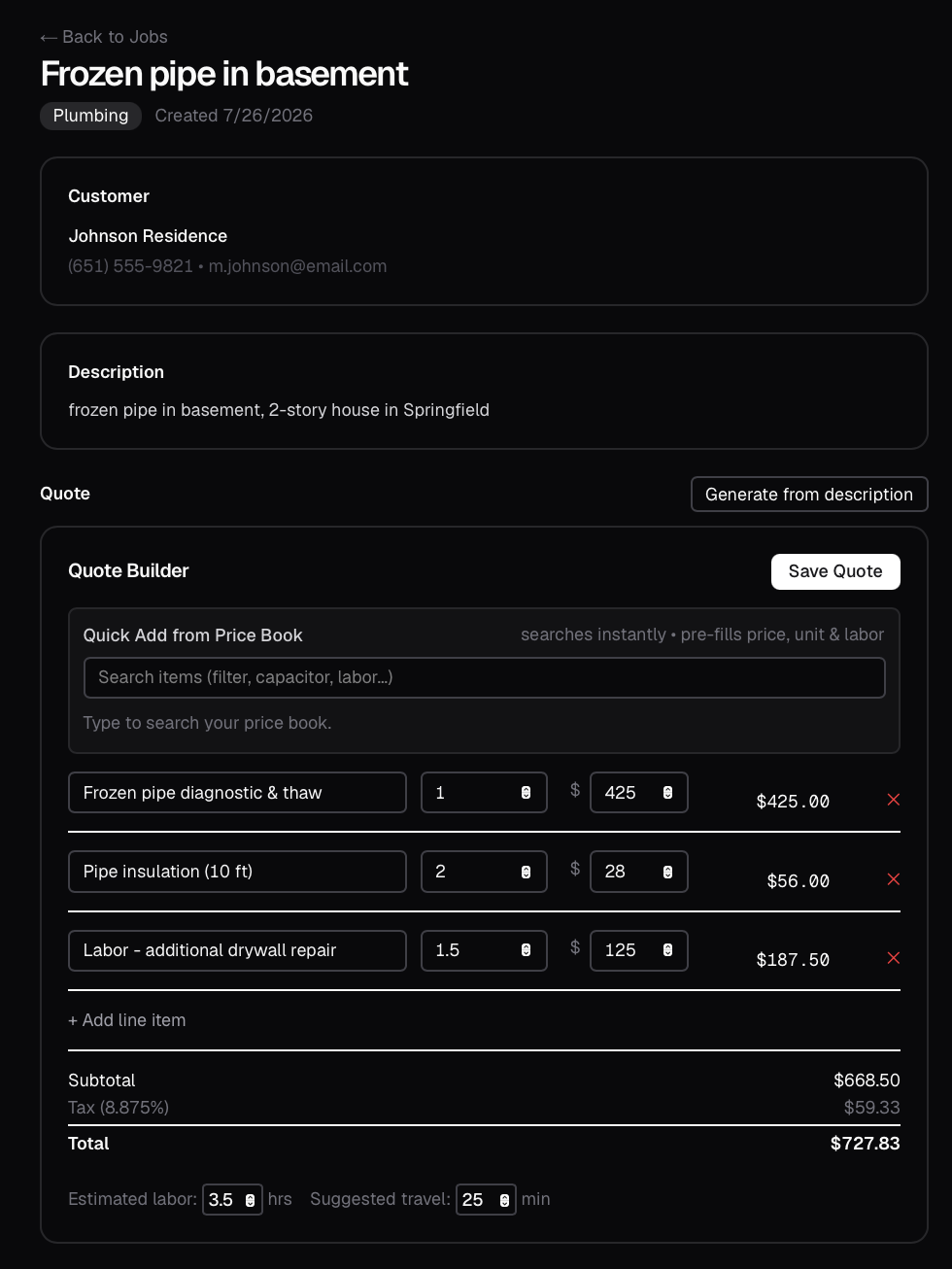
Quote builder for a frozen pipe repair. Line items are pulled from the price book with quantities and prices that can be adjusted per job. The total, tax, estimated labor, and suggested travel time update in real time.
Customer context
Field service businesses build long-term relationships with their customers. The technician heading to the Johnson Residence on Tuesday for the frozen pipe may be the same person who handled their AC tune-up a few months earlier. What the crew knows about the property and the customer affects how the job goes.
Customer information in field service is operational context, not just contact details. Knowing that a customer's house is a 2-story colonial, that the dog is friendly but loud, and that you should park in the driveway is information that makes the job go smoothly and the customer feel remembered.
Each customer record includes a freeform notes field alongside structured contact information and a complete job history. The notes are written in the language technicians actually use. The job history shows every interaction with that customer across service types, so the crew arriving for a plumbing call can see that the same customer had HVAC work done three months earlier.
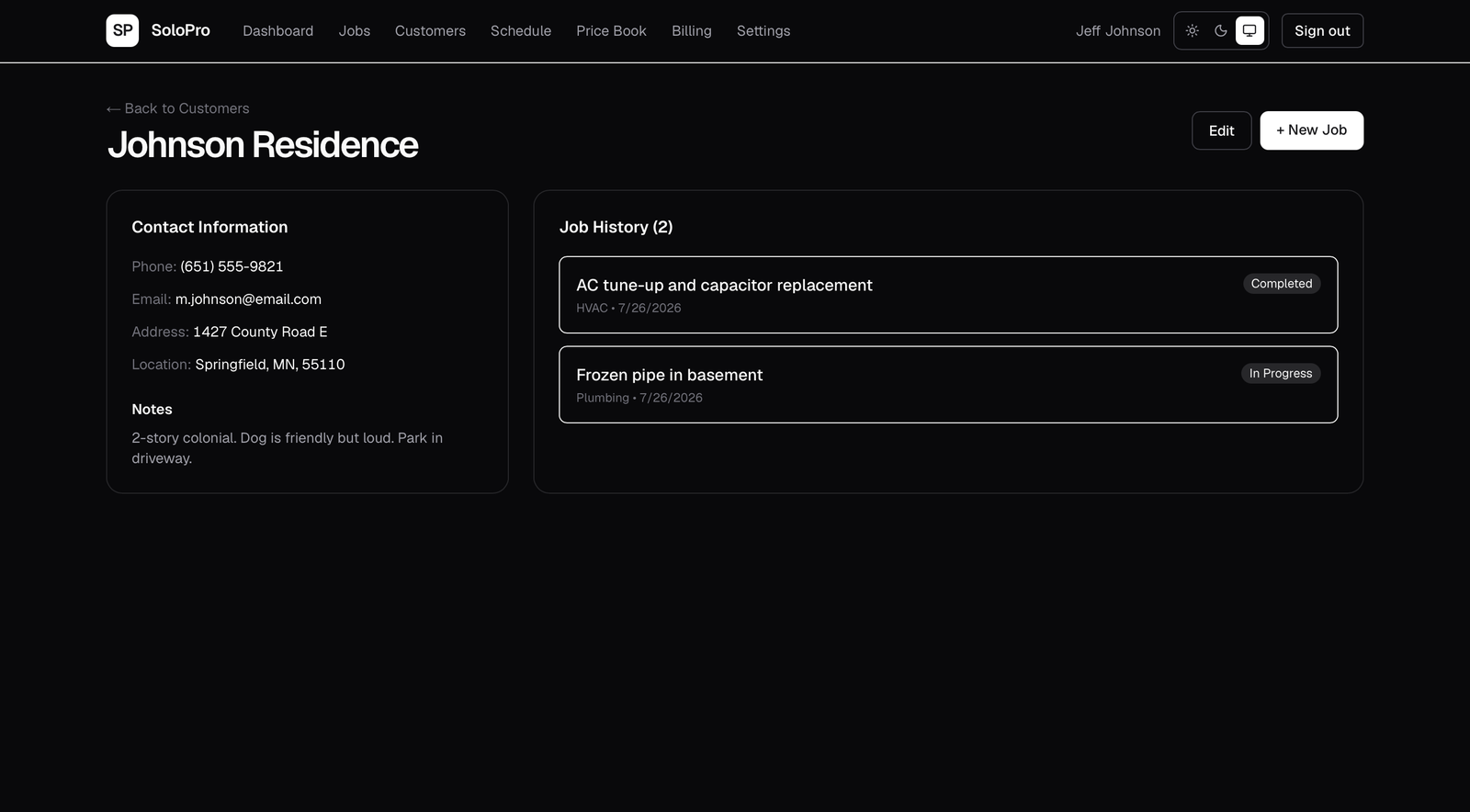
Customer record for Johnson Residence showing contact details, operational notes written by the crew, and a complete job history across service types.
The morning briefing
The owner of a field service business starts their day needing to know a handful of specific things: how many jobs are scheduled this week, whether any quotes are still waiting for a customer's decision, and where the business stands for the month. They don't need analytics. They need to know what requires their attention in the next few hours.
The dashboard for this kind of user is a morning briefing, not a reporting tool. The metrics that matter are the ones that determine what the owner does next: call the customer sitting on a pending quote, prepare for tomorrow's heavy schedule, or follow up on an open lead.
Five operational metrics are presented plainly, each with a brief description of what the number means in context. A job pipeline shows the current distribution of all active work from initial lead through completion. The greeting is personal because the tool is used by one person, not a department.
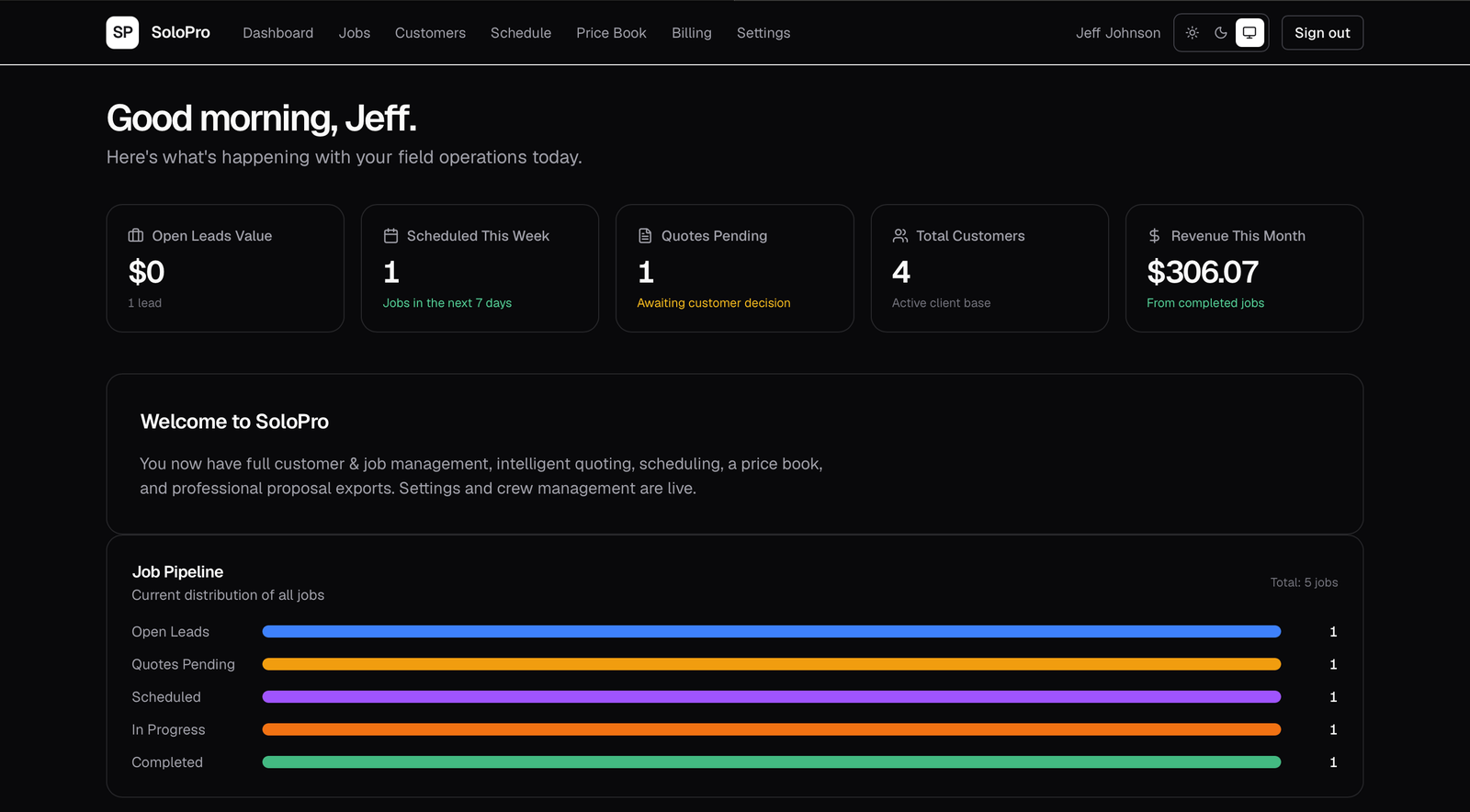
Dashboard showing five operational metrics with contextual descriptions, and a job pipeline that visualizes all active work by status.
How the pieces connect
The price book feeds the quote builder. A saved quote becomes a line-item proposal that can be sent to the customer. Completed jobs flow into billing. Company details entered once in Settings appear on every customer-facing document. Crew members added to the team appear in the schedule with their assigned colors.
Designing the quote builder without understanding the price book, or the schedule without understanding crew management, would have produced features that work individually but fail when the business tries to use them together.
What we left out
SoloPro does not include GPS tracking, automated dispatch, or inventory management. Each of these features would have added complexity for the user while solving a problem that the businesses we studied were already handling adequately through simpler means.
The owner of a three-crew operation knows where their people are because they talked to them an hour ago. They don't need a map with live pins. They need a schedule that reflects reality and a quoting system that doesn't slow them down.